Introduction
In the rapidly evolving landscape of AI applications, Retrieval Augmented Generation (RAG) has emerged as a game-changing technique that combines the power of large language models with real-time information retrieval. This comprehensive guide will walk you through building a production-ready RAG system that integrates cutting-edge technologies including Streamlit, LangChain, and the innovative Model Context Protocol (MCP).
Our system, dubbed "IntelliSearch RAG", represents a significant advancement over traditional search applications by providing intelligent, context-aware responses powered by real-time web data retrieval and sophisticated AI analysis.
What You'll Learn:
- Advanced RAG architecture design and implementation
- Modern web search integration with Exa API
- Real-time content extraction and processing
- Vector embeddings with Ollama and FAISS
- Beautiful UI development with Streamlit
- MCP Protocol for scalable AI agent communication
System Architecture Overview
Component Architecture
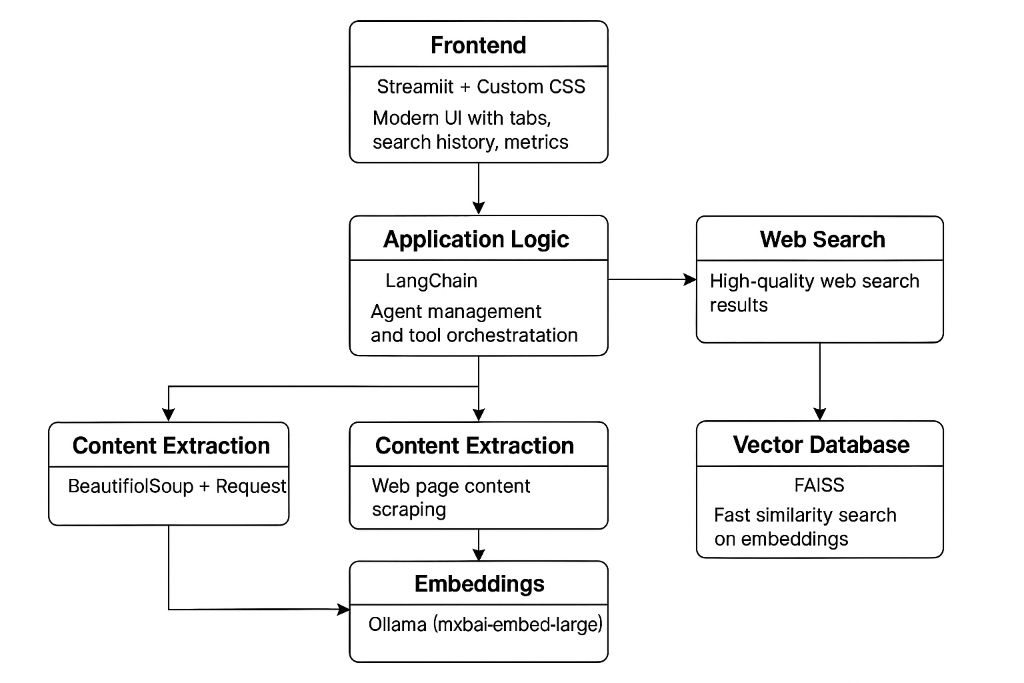
Frontend, Application Logic, and Data Processing Flow
Layered Architecture
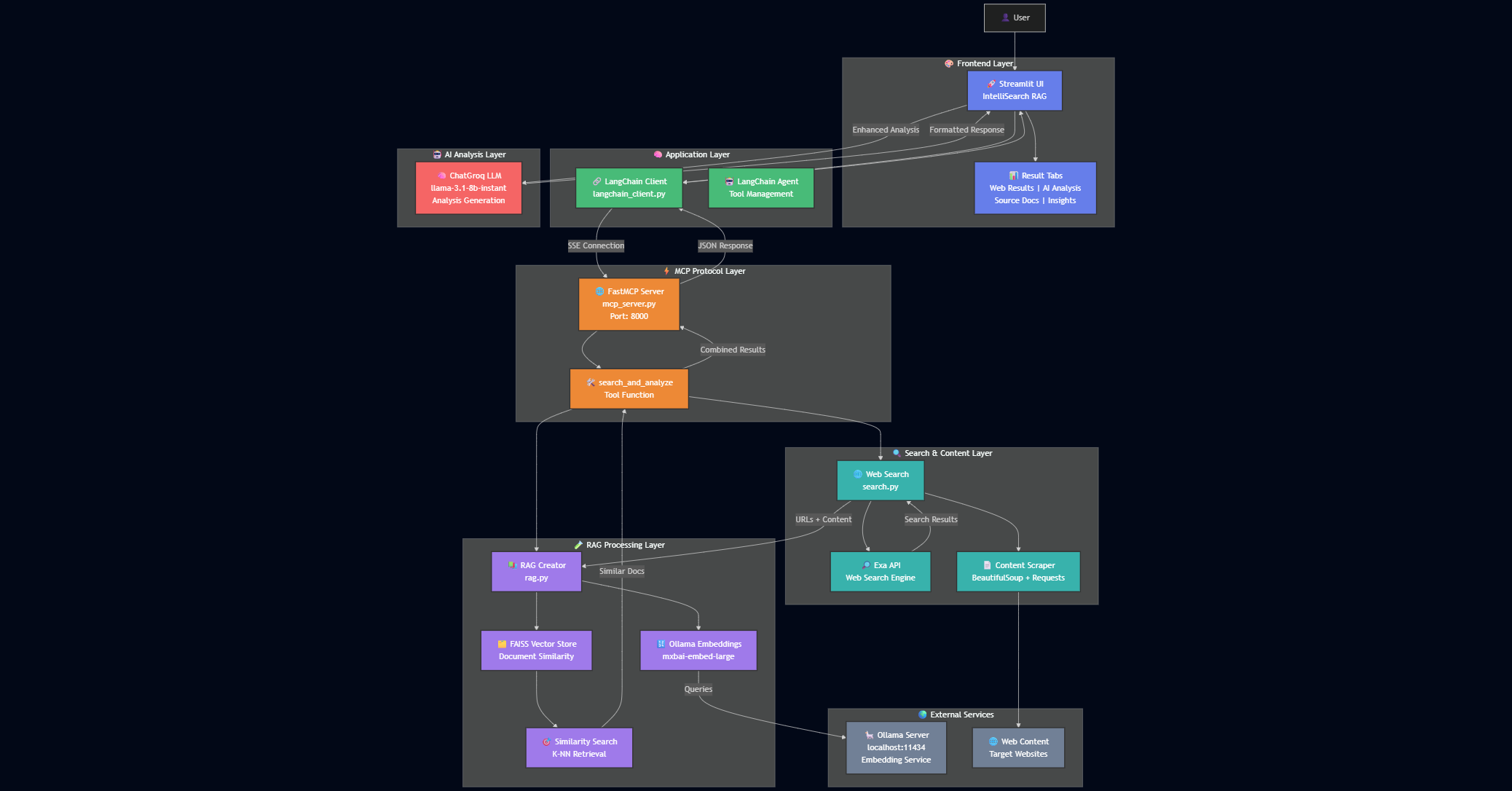
User Interface, Processing Layers, and Service Integration
Architecture Components
Frontend Layer
Streamlit + Custom CSS for modern UI with tabs, search history, and metrics
Application Logic
LangChain for agent management and tool orchestration
Web Search
High-quality web search results using Exa API
Content Extraction
BeautifulSoup + Requests for web page content scraping
Embeddings
Ollama (mxbai-embed-large) for text vectorization
Vector Database
FAISS for fast similarity search on embeddings
Technology Stack & Dependencies
Core Dependencies
# requirements.txt
streamlit
langchain
langchain-community
langchain-core
langchain-groq
langchain-mcp-adapters
python-dotenv
requests
beautifulsoup4
exa-py
firecrawl
faiss-cpu
langchain_ollama
Core Technologies
- Streamlit: Modern web UI framework
- LangChain: AI agent orchestration
- FAISS: Vector similarity search
- Ollama: Local embeddings generation
Integration APIs
- Exa API: High-quality web search
- FireCrawl API: Web content extraction
- Groq API: Fast LLM inference
- MCP Protocol: Model context communication
Core Implementation
1. Streamlit Frontend with Modern UI
The frontend leverages Streamlit with extensive custom CSS for a modern, responsive interface:
# Modern CSS styling with gradient backgrounds
import streamlit as st

st.set_page_config(
    page_title="IntelliSearch RAG",
    page_icon="🚀",
    layout="wide",
    initial_sidebar_state="expanded"
)

# Hero section with gradient background
st.markdown("""
<div class="hero-header">
    <h1 class="hero-title">🚀 IntelliSearch RAG</h1>
    <p class="hero-subtitle">Advanced AI-Powered Search with RAG</p>
</div>
""", unsafe_allow_html=True)

# Enhanced tabs for results display
tab1, tab2, tab3, tab4 = st.tabs([
    "🌐 Web Results",
    "🧠 AI Analysis",
    "📑 Source Documents",
    "📈 Insights"
])
2. LangChain MCP Client
The MCP client handles communication between the frontend and backend services:
class LangchainMCPClient:
    def __init__(self, mcp_server_url="http://localhost:8000"):
        self.llm = ChatOllama(
            model="llama2-70b",
            temperature=0.7,
            streaming=False
        )

        # Server configuration with timeout and retry settings
        server_config = {
            "default": {
                "url": f"{mcp_server_url}/sse",
                "transport": "sse",
                "options": {
                    "timeout": 30.0,
                    "retry_connect": True,
                    "max_retries": 3
                }
            }
        }

        self.mcp_client = MultiServerMCPClient(server_config)

    async def process_message(self, user_input: str):
        # Process query through MCP server
        tool = self.tools[0]
        result = await tool.coroutine(user_input)
        return result
3. Web Search with Exa API
High-quality web search using the Exa API for relevant, up-to-date information:
async def search_web(query: str, num_results: int = 5):
    # Initialize Exa client
    exa = Exa(api_key=os.getenv("EXA_API_KEY"))

    # Perform search with content and summaries
    search_results = exa.search_and_contents(
        query,
        num_results=num_results,
        summary={"query": "Main points and key takeaways"}
    )

    # Format results for display
    formatted_results = format_search_results(search_results)
    return formatted_results, search_results.results

async def get_web_content(url: str):
    # Extract content using BeautifulSoup
    headers = {"User-Agent": USER_AGENT}
    response = requests.get(url, headers=headers, timeout=30)

    soup = BeautifulSoup(response.text, 'html.parser')

    # Remove script and style elements
    for script in soup(["script", "style"]):
        script.decompose()

    text = soup.get_text(separator='\n', strip=True)
    return [Document(page_content=text, metadata={"source": url})]
4. RAG System with FAISS and Ollama
The RAG system creates embeddings and performs similarity search for relevant context:
async def create_rag_from_documents(documents: List[Document]):
    # Initialize Ollama embeddings
    embeddings = OllamaEmbeddings(
        model="mxbai-embed-large:latest",
        base_url="http://localhost:11434"
    )

    # Split documents into chunks
    text_splitter = RecursiveCharacterTextSplitter(
        chunk_size=2000,
        chunk_overlap=200,
        length_function=len,
    )
    split_documents = text_splitter.split_documents(documents)

    # Create FAISS vector store
    vectorstore = FAISS.from_documents(
        documents=split_documents,
        embedding=embeddings
    )
    return vectorstore

async def search_rag(query: str, vectorstore: FAISS, k: int = 5):
    # Perform similarity search
    results = vectorstore.similarity_search(query, k=k)
    return results
5. MCP Server with FastMCP
The MCP server orchestrates the entire search and analysis pipeline:
# Initialize FastMCP server
mcp = FastMCP(
    name="web_search_rag",
    version="1.0.0",
    description="Advanced web search with RAG integration",
    host="localhost",
    type="sse",
    port=8000,
    timeout=30,
    keep_alive=True
)

@mcp.tool()
async def search_and_analyze(
    query: str,
    num_results: int = 5,
    rag_results: int = 3
):
    # Perform web search
    formatted_results, raw_results = await search.search_web(query, num_results)

    # Extract URLs and create RAG system
    urls = [result.url for result in raw_results]
    vectorstore = await rag.create_rag(urls)
    rag_results = await rag.search_rag(query, vectorstore, k=rag_results)

    # Format and return response
    return {
        "search_results": formatted_results,
        "rag_analysis": [
            {
                "content": doc.page_content,
                "metadata": {"source": doc.metadata.get("source")}
            } for doc in rag_results
        ]
    }
Advanced Features & Capabilities
Intelligent Search
Real-time web search with AI-powered result analysis and contextual understanding.
- • High-quality search results via Exa API
- • Automatic content extraction and cleaning
- • Smart query processing and optimization
Advanced RAG Analysis
Sophisticated retrieval and generation using vector embeddings and similarity search.
- • Local embeddings with Ollama
- • Fast similarity search with FAISS
- • Context-aware response generation
Modern UI/UX
Beautiful, responsive interface with real-time updates and progress tracking.
- • Custom CSS with gradient themes
- • Interactive tabs and search history
- • Real-time progress indicators
Scalable Architecture
Modular design with MCP protocol for easy scaling and integration.
- • MCP protocol for interoperability
- • Async processing for performance
- • Modular component architecture
Performance & Metrics
Search Performance Over Time
Setup & Installation Guide
Step 1: Environment Setup
# Clone the repository
git clone https://github.com/akshayram1/Mcp_Rag_websearch_tool
cd Mcp_Rag_websearch_tool

# Create virtual environment
python -m venv venv
source venv/bin/activate  # On Windows: venv\Scripts\activate

# Install dependencies
pip install -r requirements.txt
Step 2: API Configuration
# Create .env file
EXA_API_KEY=your_exa_api_key_here
FIRECRAWL_API_KEY=your_firecrawl_api_key_here
GROQ_API_KEY=your_groq_api_key_here
Step 3: Start Ollama Server
# Install Ollama (if not already installed)
curl -fsSL https://ollama.ai/install.sh | sh

# Pull the embedding model
ollama pull mxbai-embed-large

# Start Ollama server
ollama serve
Step 4: Launch Application
# Start MCP server (Terminal 1)
python mcp_server.py

# Start Streamlit app (Terminal 2)
streamlit run app.py

# Access the application
# Open browser to http://localhost:8501
Best Practices & Optimization Tips
Do's
- ✅ Use specific, detailed search queries
- ✅ Implement proper error handling and retries
- ✅ Cache frequently accessed embeddings
- ✅ Monitor API rate limits
- ✅ Use async/await for better performance
- ✅ Implement proper logging and monitoring
Don'ts
- ❌ Don't ignore API timeout settings
- ❌ Don't store sensitive keys in code
- ❌ Don't skip input validation
- ❌ Don't use blocking operations in async functions
- ❌ Don't ignore memory usage with large documents
- ❌ Don't skip testing edge cases
Performance Optimization Tips
- Chunking Strategy: Use appropriate chunk sizes (1500-2000 tokens) with overlap
- Embedding Optimization: Batch embed multiple documents for efficiency
- Caching: Implement Redis or in-memory caching for frequent queries
- Async Processing: Use asyncio for concurrent web scraping and embedding
- Memory Management: Clear unused vectors and documents from memory
Future Enhancements & Roadmap
Short Term (1-3 months)
- • Multi-language support
- • Advanced filtering options
- • Export functionality (PDF, Word)
- • User authentication system
- • Query history analytics
Medium Term (3-6 months)
- • Integration with more search engines
- • Custom embedding models
- • Real-time collaboration features
- • Advanced analytics dashboard
- • API endpoint for external access
Long Term (6+ months)
- • AI-powered query suggestions
- • Integration with enterprise systems
- • Advanced personalization
- • Mobile application
- • Enterprise deployment options
References & Further Reading
Official Documentation
Research Papers & Technical Resources
- • "Retrieval-Augmented Generation for Knowledge-Intensive NLP Tasks" - Lewis et al., 2020
- • "Model Context Protocol Specification" - Anthropic, 2024
- • "Efficient Vector Similarity Search" - Facebook AI Research
- • "Building Production ML Systems" - Google AI Platform Team
Conclusion
This comprehensive guide has walked you through building a sophisticated RAG system that combines the latest advances in AI, web search, and user interface design. The IntelliSearch RAG system demonstrates how modern technologies can be integrated to create powerful, user-friendly applications that provide intelligent, context-aware responses.
Key achievements of this implementation include:
Technical Excellence
Modern architecture with async processing, MCP protocol integration, and efficient vector search capabilities.
User Experience
Beautiful, responsive interface with real-time feedback and comprehensive result visualization.
As the field of AI continues to evolve rapidly, this foundation provides a solid base for future enhancements and adaptations. The modular architecture ensures that new features and improvements can be easily integrated, keeping the system at the forefront of AI-powered search technology.
Ready to Build Your Own RAG System?
Start experimenting with the code, customize it for your needs, and contribute to the future of intelligent search!
MCP Protocol vs RAG: Comparison
| Feature | MCP Protocol | RAG (Retrieval Augmented Generation) |
|---|---|---|
| Purpose | Standardizes communication between AI agents and tools | Combines retrieval of external knowledge with generative models |
| Core Functionality | Defines message formats, tool APIs, and agent orchestration | Retrieves relevant documents and augments LLM responses |
| Architecture | Protocol layer for interoperability and modularity | System design pattern for knowledge-intensive tasks |
| Scalability | Highly scalable, supports distributed agent networks | Scalable with vector databases and retrieval systems |
| Integration | Integrates with any tool or agent supporting MCP | Integrates with search APIs, vector DBs, and LLMs |
| Use Case | Multi-agent orchestration, tool interoperability | Knowledge retrieval, context-aware generation |
| Example | LangChain MCP adapters, FastMCP server | RAG with LangChain, FAISS, and Ollama |
Output Screenshots
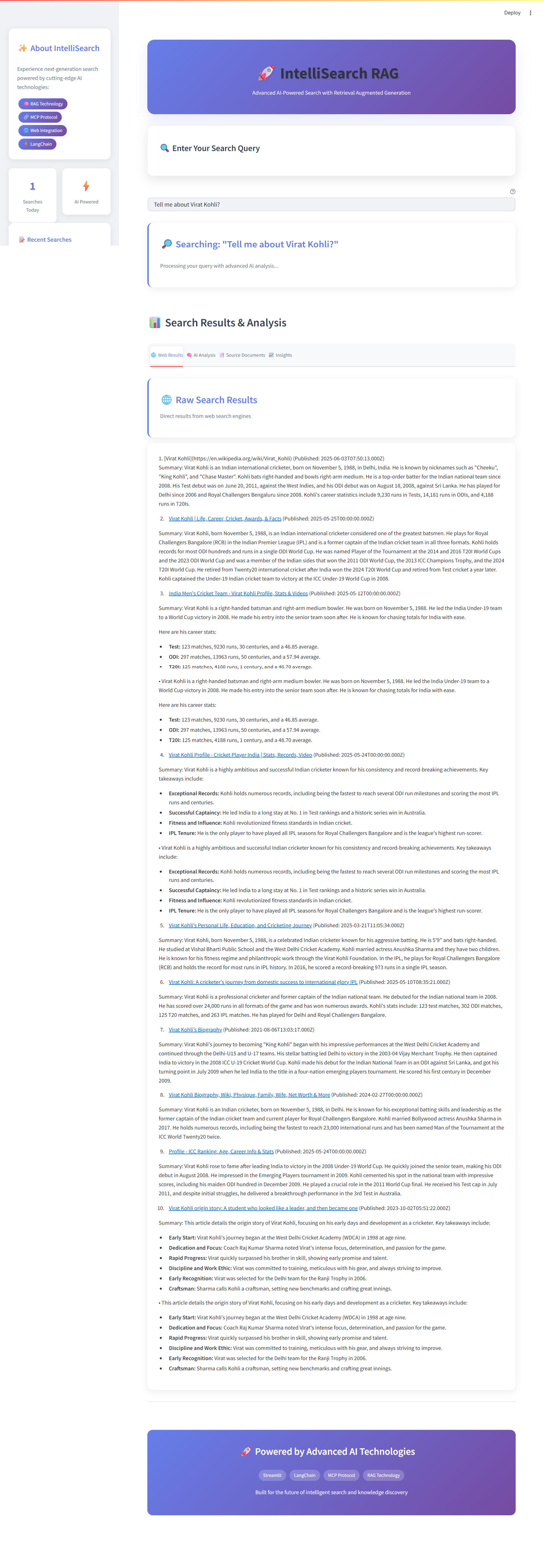 Web Results Tab - Search Results & Analysis
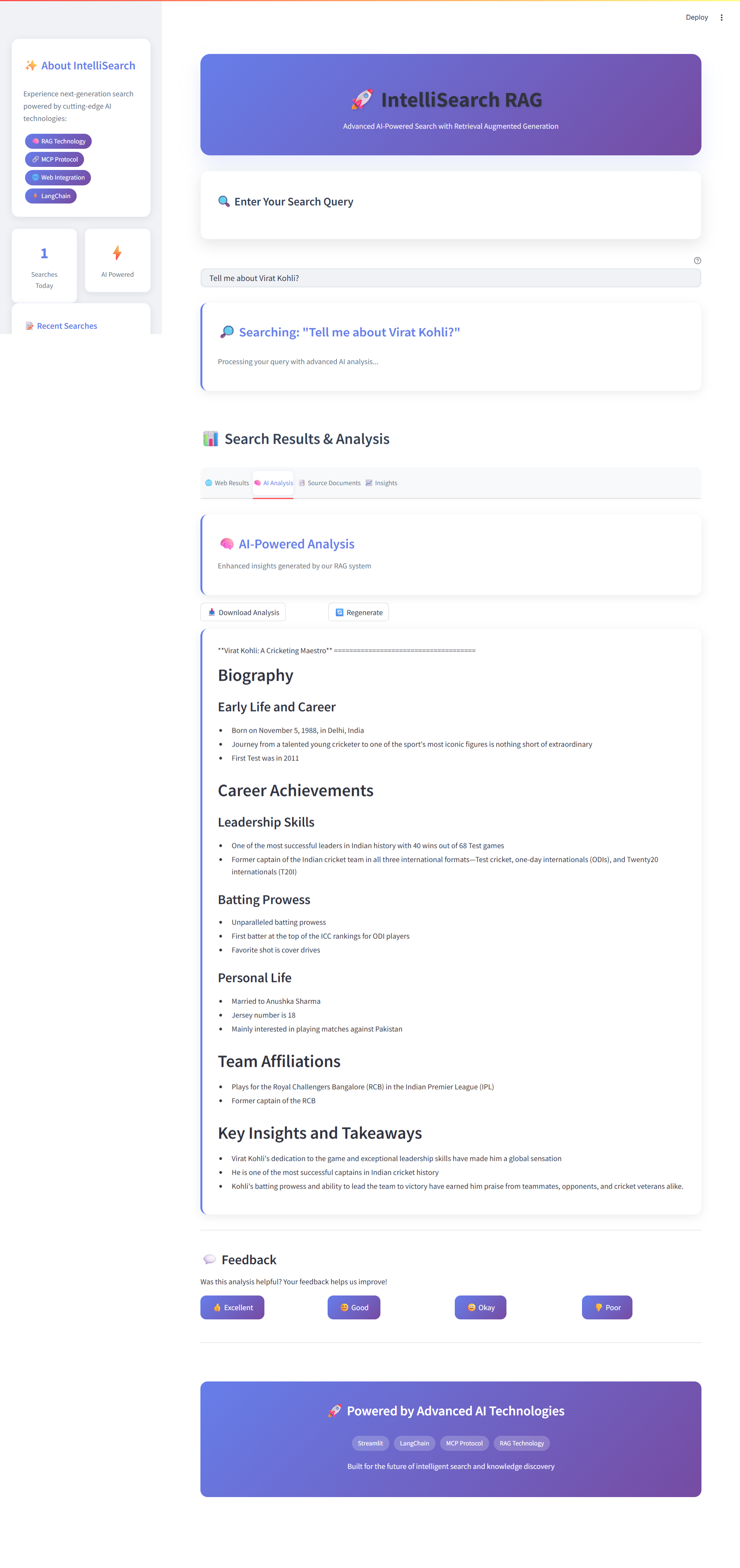 AI Analysis Tab - AI-Powered Analysis
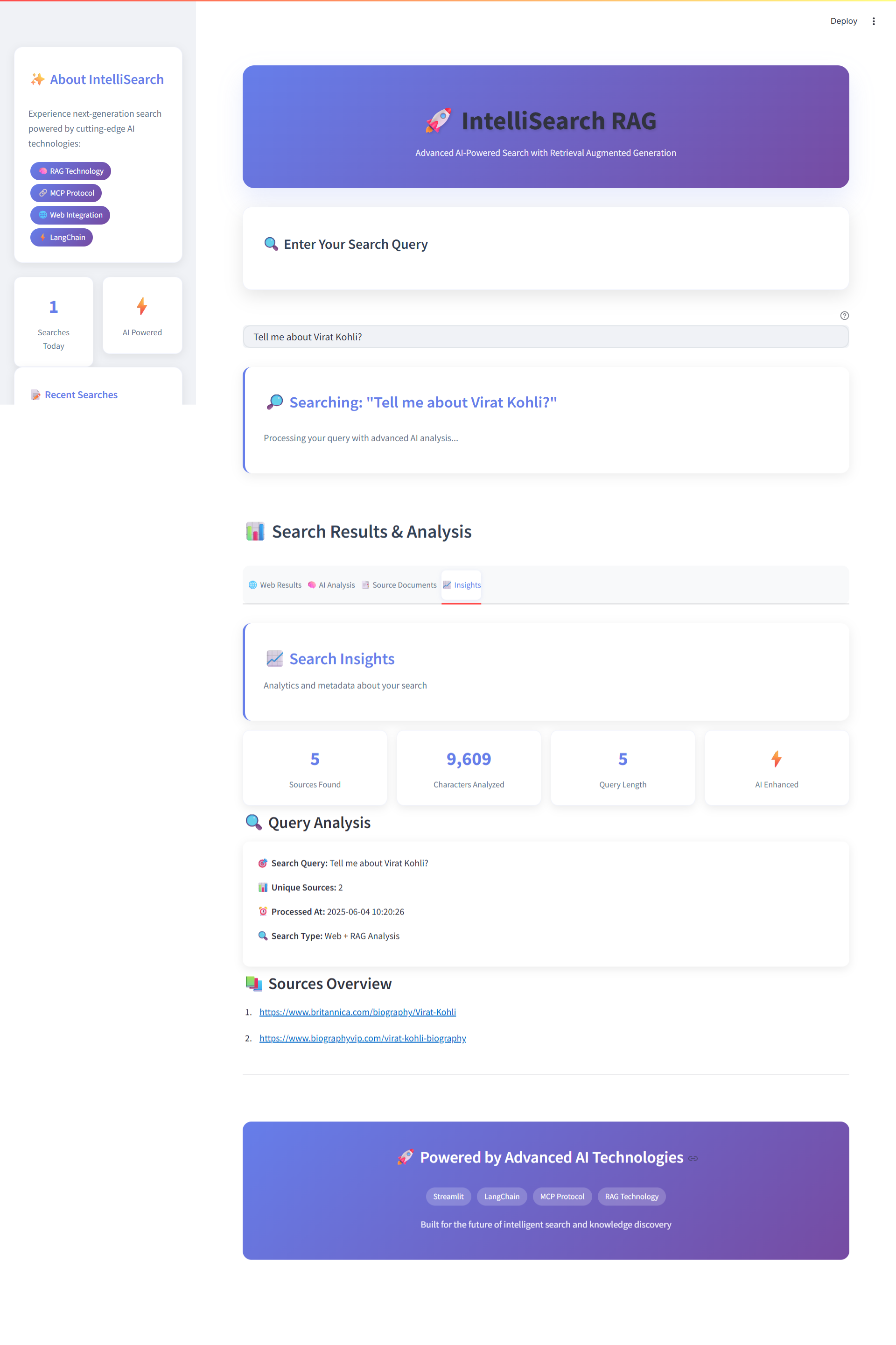 Insights Tab - Search Insights & Query Analysis
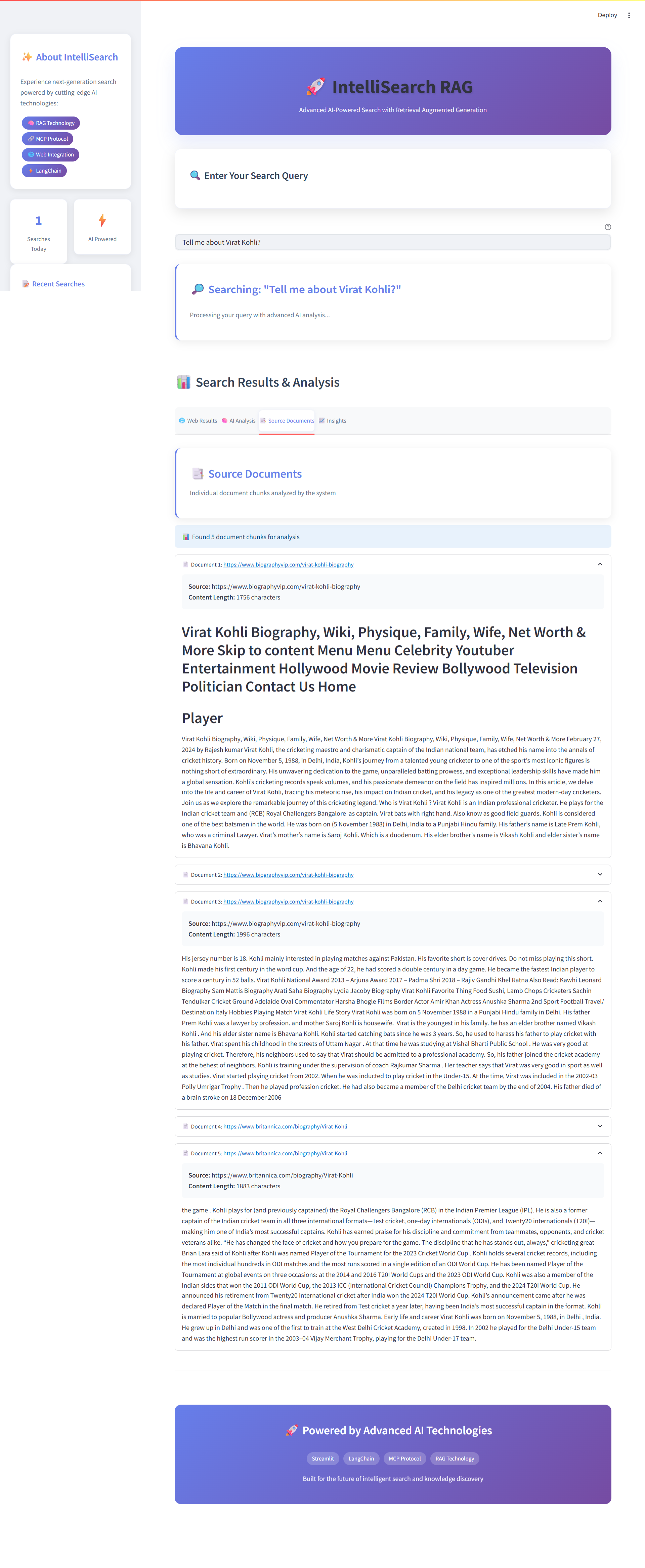 Source Documents Tab - Document Chunk Analysis